Lorem ipsum dolor sit amet, consectetur adipisic ing elit, sed do eiusm

VA - Dread Broadcast Corp. ~ Rebel Radio (2004) By MNRAQ


Artist: VA
Title Of Album: Dread Broadcast Corp. ~ Rebel Radio
Year Of Release: 2004
Label: Trojan Records
Genre: Reggae
Quality: M4A
Bitrate: VBR kbps
Total Time: 02:35:32 (2 CD)
Total Size: 373 Mb

Tracklist:

CD 1
1. Michael Prophet & Clint Eastwood - D.b.c. Jingle - It's So Nice... (1981) (1:40)
2. Aswad - Warrior Charge (5:48)
3. Sugar Minott - Dancehall We Deh (3:36)
4. Papi Levi - D.b.c. Jingle - Launch... (1982) (0:09)
5. Papi Levi - Mi God Mi King (3:58)
6. Anthony Johnson - Gunshot (3:08)
7. Ranking Miss P & Big Youth - D.b.c. Jingle - We're Hot... (1981) (0:50)
8. Burning Spear - Old Marcus Garvey (3:59)
9. Prince Lincoln & The Royal Rasses - Humanity (3:20)
10. Johnny Clarke - Declaration Of Rights (3:20)
11. Dennis Alcapone - D.b.c. Jingle - Smoke & Be Free... (1981) (0:09)
12. Barington Levy - Collie Weed (2:24)
13. Barry Brown - Politician (2:44)
14. Max Romeo - Let The Power Fall On I (2:27)
15. Laurel & Hardy - D.b.c. Jingle - D.b.c. Simply Years Ahead... (1982) (0:07)
16. Peter Tosh & The Wailers - Arise Black Man (2:36)
17. Phyllis Dillon - Woman Of The Ghetto (3:20)
18. Devon - D.b.c. Jingle - Chucky A De General... (1981) (0:39)
19. Bob Andy - The Sun Shines For Me (2:05)
20. Bunny Livingstone & The Wailers - Dreamland (2:45)
21. Gregory Isaacs - Tune In (3:43)
22. Ranking Miss P/ Jo Jo Bennett & Mudies' All Stars - D.b.c. Jingle - Dread Outta Control... (1981) / Leaving Rome (2:35)
23. Honeyboy - Jamaica (2:59)
24. The In Crowd - Back A Yard (4:19)
25. Junior Byles - A Place Called Africa (2:39)
26. Lewis Lepke - Freddie Mcgregor / D.b.c. Jingle - Dis A Rebel Radio Bwoy... / Rasta Man Camp (2:54)
27. Bob Marley & The Wailers - Concrete Jungle (3:08)
28. Dennis Brown - Wolves And Leopards (2:45)
29. Ranking Miss P - D.b.c. Jingle - Watch How We A Play De Riddim... (1982) (1:07)


CD 2
1. K.c. White - D.b.c. Jingle - Hail London... (1:11)
2. Theo Beckford - Easy Snappin' (2:48)
3. Keith & Enid - Worried Over You (3:11)
4. Tommy Mccook & The Skatelites - Cotton Tree (aka Knock Out Punch) (3:11)
5. Stranger Cole & Ken Boothe - Uno, Dos, Tres (3:06)
6. The Upsetters - D.b.c. Jingle - Jamaican Reggae/ Dark Moon (aka Blue Moon) (3:18)
7. Andy Capp - Pop A Top (2:17)
8. Devon & Ranking Miss P - Ad - Get Your T-shirts... (0:42)
9. Pat Kelly - (if It Don't Work Out) Then You Can Tell Me Goodbye (2:48)
10. Lloyd Charmers - Sweet Harmony (3:19)
11. Dave Barker - Prisoner Of Love (2:25)
12. Unknown - D.b.c. Jingle - Watcha Dawta... (0:13)
13. The Soul Sisters - Wreck A Buddy (2:29)
14. Nora Dean - Barbwire (2:31)
15. Miss T - D.b.c. Jingle - Lovers Rock Selection... (0:07)
16. Beres Hammond - Irie And Mellow (3:21)
17. Errol Dunkley - You'll Never Know (i'll Be Back) (3:33)
18. Marcia Griffiths - The First Time Ever I Saw Your Face (4:09)
19. Sonny Roberts & The Orbitone All Stars - Ad - Orbitone I... (0:32)
20. Sparrow & Byron Lee - Maria (3:05)
21. Lord Kitchener - Dr Kitch (3:55)
22. Daddy Mecka - D.b.c. Jingle - Me Love Soca (1:01)
23. Cocoa T - Lost My Sonia (3:35)
24. Cornell Campbell - Boxing (3:43)
25. Sister Nancy - Bam Bam (3:14)
26. Early B - Sunday Dish (2:59)
27. Bullwackie - D.b.c. Jingle - Music Roots Music... (0:27)
28. Don Carlos - Dice Cup (3:59)
29. Paul Blake & The Blood Fire Posse - Rub A Dub Soldier (2:57)
30. Ranking Miss P & Night Doctor - Striving To Be Free (3:57)
31. Prince Lincoln - D.b.c. Jingle - D.b.c. Has No Beginning... (1:39)

rapidgator_net:
http://rapidgator.net

secureupload_eu:
https://www.secureupload.eu

uploaded_net:
http://uploaded.net

uploadable_ch:
https://www.uploadable.ch


Read more

Extensis Portfolio Enterprise 1.6.5 (Win/Mac) By MNRAQ


Extensis Portfolio Enterprise 1.6.5 (Win/Mac) | 514.78 MB | 513.32 MB

Portfolio is the digital asset management tool for the rest of us. It's simple to set up, easy to use, and requires little to no ongoing maintenance. Within moments, you can organize your digital files and share them throughout your organization and beyond, allowing everyone to find what they need when they need it.
Easy To Use, Yet Rich With Features
Portfolio is loaded with the features you need to create, organize, find, share, and protect your assets.

File Upload and Storage
Quickly load files into Portfolio so assets are properly organized, tagged and accessible to everyone

Organize and Catalog Assets
Create meaningful collections using a combination of structure and metadata.

Catalog Templates
It's not uncommon for catalogs to share the same basic structure. Portfolio takes advantage of this and allows you to save catalog templates that can be used to create custom catalogs with a single click.

Find Assets Instantly
Portfolio doesn't just help you search libraries; it helps you find the assets you need.


Share Assets Intelligently
Get the right files into the hands of everyone involved in creating, organizing and using your assets.

Asset Distribution Portals
When select assets need to be shared outside your organization or distributed among a large group, NetPublish allows branded web portals to be easily created without any HTML or CSS skills. These self-service sites allow users to find and what they need, when they need it, from any device.

Integrate With Your Workflow
Portfolio integrates with your existing workflows and facilitates the entire asset lifecycle, including content development, collaboration and archiving.

System Requirements:

Portfolio for Windows
- Windows® Server 2008 R2 SP1, Windows Server 2012, or Windows Server 2012 R2
- 2.0 GHz or faster 4-core processor
- 16 GB RAM
- 1000 Mbit/s or faster network connection
- Microsoft® .NET Framework 3.5

Portfolio for OS X
- OS X® Server v10.7, 10.8, 10.9, or 10.10
- 2.0 GHz or faster 4-core processor
- 16 GB RAM
- 1000 Mbit/s or faster network connection

Whats new in version 1.6.5:
- Bug fixes.
Download link:


Read more

DAEMON Tools USB 2.0.0.0068 Multilingual By MNRAQ

DAEMON Tools USB 2.0.0.0068 Multilingual

DAEMON Tools USB 2.0.0.0068 Multilingual | 11.7 Mb

DAEMON Tools product for sharing USB devices. You can access remote USB devices that are physically located elsewhere. Share printers and scanners, organize a teamwork with data stored on flash drives, access your card reader remotely or work with USB devices even if your PC has damaged USB ports.


Functionality
- Get remote access to USB equipment (flash drive, speakers, webcam, printer etc.)
- Share USB devices to remote machines
- Connect to any USB device plugged to another computer via LAN, WAN, VPN or Internet
- Use rationally combined Server and Client parts
- Work with remote USB equipment just as if it was physically plugged to computer
- Support USB devices of all types and most popular versions

MAA DIYA DUAWA MARAY NALL NAY BY MNRAQ by bilarocket
Whats New:
Improved transport protocol;
Enhanced support of various USB devices.

Bugs fixed:
Minor fixes.

Operating System: Windows 8.1, Windows 8, Windows 7, Windows XP, Windows Vista, Windows Server 2008, Windows Server 2008 R2, Windows Server 2003
Download Links:

http://uploaded.net/file/sv2d81mr/DAEMONToolsUSB.2.0.0.0068.rar

https://www.secureupload.eu/h2uslph21i0c/DAEMONToolsUSB.2.0.0.0068.rar

http://rapidgator.net/file/08dbd359db3f7ac58d17c1c17e6e5495/mbam-setup-2.1.4.1018.rar.html


Read more

Increase Ram Speed Instantly By MNRAQ

Many people tries to find how to Speed up their computer, they go to Computer experts or experienced people to get the answer of their very Question because they don’t know the easy and Efficient process to do it. Today we are going to discuss about it. We will learn how Computer works, how to increase its Speed and how to make your computer faster. To know before improving pc performance we should know about something called Ram.
How To Increase Ram Speed Instantly

What is Ram (Memory)

Ram is Short form of “Random Access Memory” and it is a very important part of our Computer. When you give any kind of work to your computer to perform it firstly stores in Ram (Memory). The Processor takes the data from your Ram and performs action on it by the command of the user and provides you the result through some output devices.

If you have Slow Ram your Processor will be automatically slow. If you have Ram (Memory) speed then obviously your pc will work faster. There are many different ways to speed up your computer but Ram Speed is most important of them.

There is another question exists in most of the people’s mind that How much Ram does my Computer have??? You can simply check your Ram by right clicking on My Computer and go to properties.

How to Increase Ram (Memory) on PC

For increasing your Ram Speed you don’t need any Ram optimizer or Ram booster for your pc, you just need a powerful and rare trick that you would not have used before hopefully. You can use this trick in your Laptop or any windows you want like windows XP, Vista, 7, 8, 8.1 and others.
Follow the Steps below one by one to increase your Ram Computer Speed and you will see the magic of the trick.

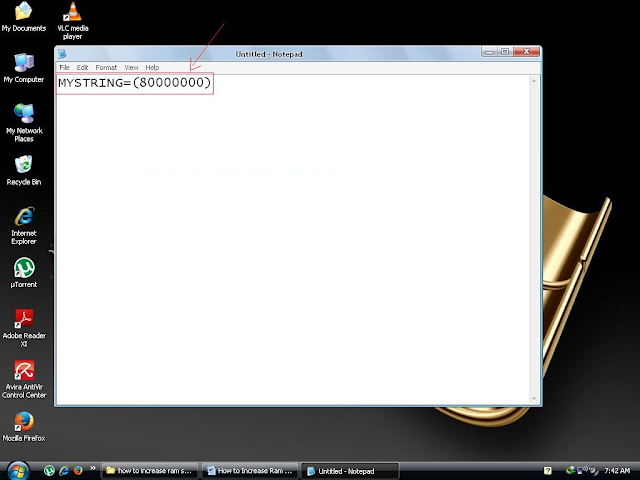
Open Notepad

Type Code
Go to save Option

Save your Notepad File as .vbe extension file

Now Open it by Double Click
Text Form Instructions:
Step 1: Go to run (win + r) and type “notepad” without quotes.
Step 2: Type this code in your notepad without quotes “MYSTRING=(80000000)”.
Step 3: Save the file.
Step 4: Name of the file: “ram.vbe” and type of the file: “All files”.
Step 5: Make sure your file should be saved on Desktop. You can open it by Double clicking on the file.
Note: when you assume that your pc is working slowly, double click on the Icon on your Desktop. You will see the change in your computer speed.
All done, Enjoy…


Read more

WirelessMon 4.0.0 Build 1009 By MNRAQ

WirelessMon 4.0.0 Build 1009

WirelessMon 4.0.0 Build 1009 | 3.45 Mb

Passmark WirelessMon is a software tool that allows users to monitor the status of wireless WiFi adapter(s) and gather information about nearby wireless access points and hot spots in real time. WirelessMon can log the information it collects into a file, while also providing comprehensive graphing of signal level and real time IP and 802.11 WiFi statistics.

The following wireless LAN information can be provided by WirelessMon (when available, as not all wireless adapters will support all of these features):
Current connection information: SSID; Connected Access Point MAC Address; Signal strength; Tx Power; Auth type; RTS Threshold; Frag Threshold; Channel; Frequency; Number of Antennas; Beacon Period; ATIM Window; Dwell Time; Hop Pattern; Hop Set.
Staistics information: Transmitted Fragment Count; Multicast Transmitted Frame Count; Failed Count; Retry Count; Multiple Retry Count; RTS Success Count; RTS Failure Count; ACK Failure Count; Frame Duplicate Count; Received Fragment Count; Multicast Received Frame Count; Sent OK; RCV OK; Sent Error; RCV Error; Direct Bytes Sent; Directed Frames Sent; Multicast Bytes Sent; Multicast Frames Sent; Broadcasts Bytes Sent; Broadcasts Frames Sent; Directed Bytes RCV; Directed Frames RCV; Multicast Bytes RCV; Multicast Frames RCV; Broadcasts Bytes RCV; Broadcasts Frames RCV.
IP information: Adapter MAC Address; Adapter Name; Adapter IP Address; Subnet Mask; DHCP Enabled; Gateway Address; DHCP Server; Lease Obtained; Lease Expired; DNS Server.
IP counter information: Band Width; Sent Rate (Bytes/Second); Data Rate (Packets/Second); RCV Rate (Packets /Second); Sent Rate (Packets/Second); Output Queue Length; RCV Counter Error; Sent Counter Error.

▶ InnJoo SmartPhone i1s _ Promotion Video By MNRAQ by bilarocket
Key features :
Verify 802.11 network configuration is correct.
Test WiFi hardware and device drivers are functioning correctly.
Check signal levels from your local WiFi network and nearby networks.
Help locate sources of interference to your network.
Scan for hot spots in your local area (wardriving)
Create signal strength maps of an area
GPS support for logging and mapping signal strength
Correctly locate your wireless antenna (especially important for directional antennas).
Verify the security settings for local access points.
Measure network speed & throughput and view available data rates.
Help check Wifi network coverage and range

What's new in WirelessMon 4.0 Build 1009:
Added support to display when a network is 802.11AC
Increased size of "Select AP" dialog window so maximum SSID names and MAC address can be displayed without the need for scrolling/resizing the window
Decreased memory use when saving a signal strength image to try and prevent out of memory errors when working with very large maps
Fixed a display/synchronisation issue with the access point list occasionally assigning the wrong status icon to an entry if rapidly sorting the list

Download-

http://uploaded.net/file/l7y9nolr/wirelessmon-4.0.B.1009.rar

https://www.secureupload.eu/mdzmnzi6kl0d/wirelessmon-4.0.B.1009.rar

http://rapidgator.net/file/8afbae364e42d31706debc0585519d08/wirelessmon-4.0.B.1009.rar.html


Read more

How to Check Internet Speed By MNRAQ

In this Modern World every one is using Internet. Internet is our need, our habit, our Time pass material and many more. Internet plays a vital role in every ones life like doctor, lawyer, student, teacher, banker, business man, Engineer and so on. In fact every department is using the Internet. Without Internet we are nothing. You are also using Internet for a very long time but have you ever think that what is my Internet Speed? Or How to test my Internet Connection Speed? May be you don’t have thought about it. But don’t worry I am going to tell you the method to Test Network Speed or determine Speed of Internet Connection by opening just one link.
How to Check Internet Speed

Find Out my Internet Speed

Have you ever tried to check your Internet Speed? May be not. It is very easy and useful trick to find out your Internet Speed. To Test Connection Speed you don’t need any experience or Special trick. You should just know the basics of the Computer. You can get your Dsl Speed test or net using by Land Line or by using a portable device like usb of any other sorts. No matter what net you are using, you can assume your net Speed test by having an Online Speed test.

Online Speed Check

To Online Internet Speed test or Modem Speed Test, we need an Internet Speed tester (Internet Speed Checker, which will check our Internet Speed). There are many websites which provides us Online Speed tester to Broadband or Bandwidth Speed test. Bandwidth is the primary measurement of Network Speed tests. 

Check My Internet Speed

You don’t need to do a lot of hard work to check Internet Speed; you just need to open a Website which provides you the online speed tester to check your Speed. You have to Go to that website and click on “My Speed test” or “Test My Connection”. Just Follow the Steps Below and you will get what is your exactly Internet Speed is:
How to Check Internet Speed Step 1
How to Check Internet Speed Step 2
How to Check Internet Speed Step 3
How to Check Internet Speed Step 4


Textual Steps:

Step1: Open your Internet Browser (Firefox, Chrome or etc).

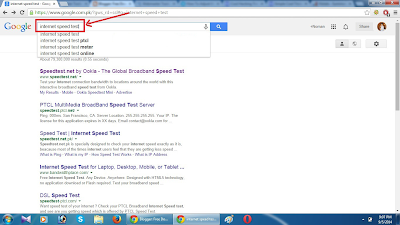
Step2: Type in there “Internet Speed Test” in Google.

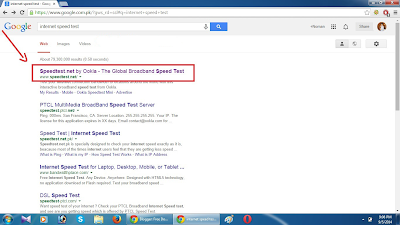
Step3: Open first link (Speed Test by Ookla).

Step4: Click on “begin test” and you will see your Internet Speed in numbers.

All Done. This is a very easy way of Online Speed Test of Internet.

Enjoy.


Read more

Like Us On Facebook

Please Wait 10 Seconds...!!!Skip
Like and support US


Related Posts Plugin for WordPress, Blogger...